


Article original : Python Requests – How to Interact with Web Services using Python
Une API, ou Interface de Programmation d'Applications, facilite la communication entre deux logiciels. Elle permet de récupérer et d'envoyer des données à l'aide de code. Nous utilisons principalement les API pour récupérer des données, et ce sera l'objectif de ce tutoriel pour débutants.
Lorsque nous voulons recevoir des données d'une API, nous devons faire une requête. Les requêtes sont utilisées partout sur le web. Par exemple, lorsque vous avez visité cet article de blog, votre navigateur web a fait une requête au serveur web de freeCodeCamp, qui a répondu avec le contenu de cette page web.
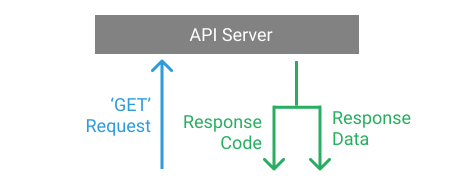
Les requêtes API fonctionnent exactement de la même manière – vous faites une requête à un serveur API pour des données, et il répond à votre requête.
Différentes méthodes HTTP et codes de statut
Il existe diverses méthodes HTTP pour les API REST. Ces méthodes indiquent à l'API quelles opérations doivent être effectuées sur les données. Bien qu'il existe de nombreuses méthodes HTTP, les cinq méthodes listées ci-dessous sont les plus couramment utilisées avec les API REST :
| Méthode HTTP | Description |
|---|---|
GET | Récupérer des données existantes |
POST | Ajouter de nouvelles données |
PUT | Mettre à jour des données existantes |
PATCH | Mettre à jour partiellement des données existantes |
DELETE | Supprimer des données |
Une fois qu'une API REST reçoit et traite une requête HTTP, elle retourne une réponse avec un code de statut HTTP. Ce code de statut fournit des informations sur la réponse et aide l'application cliente à savoir quel type de réponse elle reçoit.
Les codes de statut sont numérotés en fonction de la catégorie du résultat :
| Plage de codes | Catégorie |
|---|---|
1xx | Réponse informative |
2xx | Opération réussie |
3xx | Redirection |
4xx | Erreur client |
5xx | Erreur serveur |
Vous pouvez en apprendre davantage sur les codes de statut HTTP à partir des MDN Web Docs.
Points de terminaison de l'API
Les points de terminaison de l'API sont les URL publiques exposées par le serveur qu'une application cliente utilise pour accéder aux ressources et aux données.
Pour les besoins de ce tutoriel, nous utiliserons l'API REST Fake Store. Plus précisément, nous utiliserons les points de terminaison suivants :
| Méthode HTTP | Point de terminaison de l'API | Description |
|---|---|---|
GET | /products | Obtenir une liste de produits. |
GET | /products?limit=x | Obtenir seulement 5 produits. |
GET | /products/<product_id> | Obtenir un seul produit. |
POST | /products | Créer un nouveau produit. |
PUT | /products/<product_id> | Mettre à jour un produit. |
PATCH | /products/<product_id> | Mettre à jour partiellement un produit. |
DELETE | /products/<product_id> | Supprimer un produit. |
Chacun des points de terminaison ci-dessus effectue une action différente en fonction de la méthode HTTP. Pour chaque URL d'API, l'URL de base est : https://fakestoreapi.com. Nous allons les explorer un par un.
Mais d'abord, nous devons installer une bibliothèque externe pour consommer ces API. La plupart des développeurs Python utilisent la bibliothèque requests pour interagir avec les services web. Vous pouvez installer cette bibliothèque en utilisant la commande pip comme ceci :
$ pip install requests
Une fois la bibliothèque installée, nous sommes prêts à partir !
Comment faire une requête GET
C'est l'une des méthodes de requête HTTP les plus courantes que vous rencontrerez. Il s'agit d'une opération en lecture seule qui permet de récupérer des données à partir de l'API.
Essayons la requête GET sur le premier point de terminaison que nous avons mentionné ci-dessus qui répond avec une liste de produits.
import requests

BASE_URL = 'https://fakestoreapi.com'

response = requests.get(f"{BASE_URL}/products")
print(response.json())
Le script ci-dessus utilise la méthode requests.get() pour envoyer une requête GET sur le point de terminaison de l'API /products. Il répond avec une liste de tous les produits. Nous appelons ensuite .json() pour voir la réponse JSON, qui ressemble à ceci :
[
    {
        "id": 1,
        "title": "Fjallraven - Foldsack No. 1 Backpack, Fits 15 Laptops",
        "price": 109.95,
        "description": "Your perfect pack for everyday use and walks in the forest. Stash your laptop (up to 15 inches) in the padded sleeve, your everyday",
        "category": "men's clothing",
        "image": "https://fakestoreapi.com/img/81fPKd-2AYL._AC_SL1500_.jpg",
        "rating": {
            "rate": 3.9,
            "count": 120
        }
    },
    {
        "id": 2,
        "title": "Mens Casual Premium Slim Fit T-Shirts ",
        "price": 22.3,
        "description": "Slim-fitting style, contrast raglan long sleeve, three-button henley placket, light weight & soft fabric for breathable and comfortable wearing. And Solid stitched shirts with round neck made for durability and a great fit for casual fashion wear and diehard baseball fans. The Henley style round neckline includes a three-button placket.",
        "category": "men's clothing",
        "image": "https://fakestoreapi.com/img/71-3HjGNDUL._AC_SY879._SX._UX._SY._UY_.jpg",
        "rating": {
            "rate": 4.1,
            "count": 259
        }
    },
    {
        "id": 3,
        "title": "Mens Cotton Jacket",
        "price": 55.99,
        "description": "great outerwear jackets for Spring/Autumn/Winter, suitable for many occasions, such as working, hiking, camping, mountain/rock climbing, cycling, traveling or other outdoors. Good gift choice for you or your family member. A warm hearted love to Father, husband or son in this thanksgiving or Christmas Day.",
        "category": "men's clothing",
        "image": "https://fakestoreapi.com/img/71li-ujtlUL._AC_UX679_.jpg",
        "rating": {
            "rate": 4.7,
            "count": 500
        }
    },
    {
        "id": 4,
        "title": "Mens Casual Slim Fit",
        "price": 15.99,
        "description": "The color could be slightly different between on the screen and in practice. / Please note that body builds vary by person, therefore, detailed size information should be reviewed below on the product description.",
        "category": "men's clothing",
        "image": "https://fakestoreapi.com/img/71YXzeOuslL._AC_UY879_.jpg",
        "rating": {
            "rate": 2.1,
            "count": 430
        }
    },
    {
        "id": 5,
        "title": "John Hardy Women's Legends Naga Gold & Silver Dragon Station Chain Bracelet",
        "price": 695,
        "description": "From our Legends Collection, the Naga was inspired by the mythical water dragon that protects the ocean's pearl. Wear facing inward to be bestowed with love and abundance, or outward for protection.",
        "category": "jewelery",
        "image": "https://fakestoreapi.com/img/71pWzhdJNwL._AC_UL640_QL65_ML3_.jpg",
        "rating": {
            "rate": 4.6,
            "count": 400
        }
    },
    {
        "id": 6,
        "title": "Solid Gold Petite Micropave ",
        "price": 168,
        "description": "Satisfaction Guaranteed. Return or exchange any order within 30 days.Designed and sold by Hafeez Center in the United States. Satisfaction Guaranteed. Return or exchange any order within 30 days.",
        "category": "jewelery",
        "image": "https://fakestoreapi.com/img/61sbMiUnoGL._AC_UL640_QL65_ML3_.jpg",
        "rating": {
            "rate": 3.9,
            "count": 70
        }
    },
    {
        "id": 7,
        "title": "White Gold Plated Princess",
        "price": 9.99,
        "description": "Classic Created Wedding Engagement Solitaire Diamond Promise Ring for Her. Gifts to spoil your love more for Engagement, Wedding, Anniversary, Valentine's Day...",
        "category": "jewelery",
        "image": "https://fakestoreapi.com/img/71YAIFU48IL._AC_UL640_QL65_ML3_.jpg",
        "rating": {
            "rate": 3,
            "count": 400
        }
    },
    {
        "id": 8,
        "title": "Pierced Owl Rose Gold Plated Stainless Steel Double",
        "price": 10.99,
        "description": "Rose Gold Plated Double Flared Tunnel Plug Earrings. Made of 316L Stainless Steel",
        "category": "jewelery",
        "image": "https://fakestoreapi.com/img/51UDEzMJVpL._AC_UL640_QL65_ML3_.jpg",
        "rating": {
            "rate": 1.9,
            "count": 100
        }
    },
    {
        "id": 9,
        "title": "WD 2TB Elements Portable External Hard Drive - USB 3.0 ",
        "price": 64,
        "description": "USB 3.0 and USB 2.0 Compatibility Fast data transfers Improve PC Performance High Capacity; Compatibility Formatted NTFS for Windows 10, Windows 8.1, Windows 7; Reformatting may be required for other operating systems; Compatibility may vary depending on users hardware configuration and operating system",
        "category": "electronics",
        "image": "https://fakestoreapi.com/img/61IBBVJvSDL._AC_SY879_.jpg",
        "rating": {
            "rate": 3.3,
            "count": 203
        }
    },
    {
        "id": 10,
        "title": "SanDisk SSD PLUS 1TB Internal SSD - SATA III 6 Gb/s",
        "price": 109,
        "description": "Easy upgrade for faster boot up, shutdown, application load and response (As compared to 5400 RPM SATA 2.5 hard drive; Based on published specifications and internal benchmarking tests using PCMark vantage scores) Boosts burst write performance, making it ideal for typical PC workloads The perfect balance of performance and reliability Read/write speeds of up to 535MB/s/450MB/s (Based on internal testing; Performance may vary depending upon drive capacity, host device, OS and application.)",
        "category": "electronics",
        "image": "https://fakestoreapi.com/img/61U7T1koQqL._AC_SX679_.jpg",
        "rating": {
            "rate": 2.9,
            "count": 470
        }
    },
    {
        "id": 11,
        "title": "Silicon Power 256GB SSD 3D NAND A55 SLC Cache Performance Boost SATA III 2.5",
        "price": 109,
        "description": "3D NAND flash are applied to deliver high transfer speeds Remarkable transfer speeds that enable faster bootup and improved overall system performance. The advanced SLC Cache Technology allows performance boost and longer lifespan 7mm slim design suitable for Ultrabooks and Ultra-slim notebooks. Supports TRIM command, Garbage Collection technology, RAID, and ECC (Error Checking & Correction) to provide the optimized performance and enhanced reliability.",
        "category": "electronics",
        "image": "https://fakestoreapi.com/img/71kWymZ+c+L._AC_SX679_.jpg",
        "rating": {
            "rate": 4.8,
            "count": 319
        }
    },
    {
        "id": 12,
        "title": "WD 4TB Gaming Drive Works with Playstation 4 Portable External Hard Drive",
        "price": 114,
        "description": "Expand your PS4 gaming experience, Play anywhere Fast and easy, setup Sleek design with high capacity, 3-year manufacturer's limited warranty",
        "category": "electronics",
        "image": "https://fakestoreapi.com/img/61mtL65D4cL._AC_SX679_.jpg",
        "rating": {
            "rate": 4.8,
            "count": 400
        }
    },
    {
        "id": 13,
        "title": "Acer SB220Q bi 21.5 inches Full HD (1920 x 1080) IPS Ultra-Thin",
        "price": 599,
        "description": "21. 5 inches Full HD (1920 x 1080) widescreen IPS display And Radeon free Sync technology. No compatibility for VESA Mount Refresh Rate: 75Hz - Using HDMI port Zero-frame design | ultra-thin | 4ms response time | IPS panel Aspect ratio - 16: 9. Color Supported - 16. 7 million colors. Brightness - 250 nit Tilt angle -5 degree to 15 degree. Horizontal viewing angle-178 degree. Vertical viewing angle-178 degree 75 hertz",
        "category": "electronics",
        "image": "https://fakestoreapi.com/img/81QpkIctqPL._AC_SX679_.jpg",
        "rating": {
            "rate": 2.9,
            "count": 250
        }
    },
    {
        "id": 14,
        "title": "Samsung 49-Inch CHG90 144Hz Curved Gaming Monitor (LC49HG90DMNXZA)  Super Ultrawide Screen QLED ",
        "price": 999.99,
        "description": "49 INCH SUPER ULTRAWIDE 32:9 CURVED GAMING MONITOR with dual 27 inch screen side by side QUANTUM DOT (QLED) TECHNOLOGY, HDR support and factory calibration provides stunningly realistic and accurate color and contrast 144HZ HIGH REFRESH RATE and 1ms ultra fast response time work to eliminate motion blur, ghosting, and reduce input lag",
        "category": "electronics",
        "image": "https://fakestoreapi.com/img/81Zt42ioCgL._AC_SX679_.jpg",
        "rating": {
            "rate": 2.2,
            "count": 140
        }
    },
    {
        "id": 15,
        "title": "BIYLACLESEN Women's 3-in-1 Snowboard Jacket Winter Coats",
        "price": 56.99,
        "description": "Note:The Jackets is US standard size, Please choose size as your usual wear Material: 100% Polyester; Detachable Liner Fabric: Warm Fleece. Detachable Functional Liner: Skin Friendly, Lightweigt and Warm.Stand Collar Liner jacket, keep you warm in cold weather. Zippered Pockets: 2 Zippered Hand Pockets, 2 Zippered Pockets on Chest (enough to keep cards or keys)and 1 Hidden Pocket Inside.Zippered Hand Pockets and Hidden Pocket keep your things secure. Humanized Design: Adjustable and Detachable Hood and Adjustable cuff to prevent the wind and water,for a comfortable fit. 3 in 1 Detachable Design provide more convenience, you can separate the coat and inner as needed, or wear it together. It is suitable for different season and help you adapt to different climates",
        "category": "women's clothing",
        "image": "https://fakestoreapi.com/img/51Y5NI-I5jL._AC_UX679_.jpg",
        "rating": {
            "rate": 2.6,
            "count": 235
        }
    },
    {
        "id": 16,
        "title": "Lock and Love Women's Removable Hooded Faux Leather Moto Biker Jacket",
        "price": 29.95,
        "description": "100% POLYURETHANE(shell) 100% POLYESTER(lining) 75% POLYESTER 25% COTTON (SWEATER), Faux leather material for style and comfort / 2 pockets of front, 2-For-One Hooded denim style faux leather jacket, Button detail on waist / Detail stitching at sides, HAND WASH ONLY / DO NOT BLEACH / LINE DRY / DO NOT IRON",
        "category": "women's clothing",
        "image": "https://fakestoreapi.com/img/81XH0e8fefL._AC_UY879_.jpg",
        "rating": {
            "rate": 2.9,
            "count": 340
        }
    },
    {
        "id": 17,
        "title": "Rain Jacket Women Windbreaker Striped Climbing Raincoats",
        "price": 39.99,
        "description": "Lightweight perfet for trip or casual wear---Long sleeve with hooded, adjustable drawstring waist design. Button and zipper front closure raincoat, fully stripes Lined and The Raincoat has 2 side pockets are a good size to hold all kinds of things, it covers the hips, and the hood is generous but doesn't overdo it.Attached Cotton Lined Hood with Adjustable Drawstrings give it a real styled look.",
        "category": "women's clothing",
        "image": "https://fakestoreapi.com/img/71HblAHs5xL._AC_UY879_-2.jpg",
        "rating": {
            "rate": 3.8,
            "count": 679
        }
    },
    {
        "id": 18,
        "title": "MBJ Women's Solid Short Sleeve Boat Neck V ",
        "price": 9.85,
        "description": "95% RAYON 5% SPANDEX, Made in USA or Imported, Do Not Bleach, Lightweight fabric with great stretch for comfort, Ribbed on sleeves and neckline / Double stitching on bottom hem",
        "category": "women's clothing",
        "image": "https://fakestoreapi.com/img/71z3kpMAYsL._AC_UY879_.jpg",
        "rating": {
            "rate": 4.7,
            "count": 130
        }
    },
    {
        "id": 19,
        "title": "Opna Women's Short Sleeve Moisture",
        "price": 7.95,
        "description": "100% Polyester, Machine wash, 100% cationic polyester interlock, Machine Wash & Pre Shrunk for a Great Fit, Lightweight, roomy and highly breathable with moisture wicking fabric which helps to keep moisture away, Soft Lightweight Fabric with comfortable V-neck collar and a slimmer fit, delivers a sleek, more feminine silhouette and Added Comfort",
        "category": "women's clothing",
        "image": "https://fakestoreapi.com/img/51eg55uWmdL._AC_UX679_.jpg",
        "rating": {
            "rate": 4.5,
            "count": 146
        }
    },
    {
        "id": 20,
        "title": "DANVOUY Womens T Shirt Casual Cotton Short",
        "price": 12.99,
        "description": "95%Cotton,5%Spandex, Features: Casual, Short Sleeve, Letter Print,V-Neck,Fashion Tees, The fabric is soft and has some stretch., Occasion: Casual/Office/Beach/School/Home/Street. Season: Spring,Summer,Autumn,Winter.",
        "category": "women's clothing",
        "image": "https://fakestoreapi.com/img/61pHAEJ4NML._AC_UX679_.jpg",
        "rating": {
            "rate": 3.6,
            "count": 145
        }
    }
]
Si vous regardez de près, la réponse JSON ressemble à une liste de dictionnaires Python. JSON est un format d'échange de données très populaire pour les API REST.
Vous pouvez également imprimer d'autres attributs liés à la réponse tels que le code de statut.
print(response.status_code)

# SORTIE
>>> 200
Comme nous le savons, le code de statut 200 signifie une réponse réussie.
Puisque le point de terminaison /products retourne beaucoup de données, limitons ces données à seulement 3 produits.
Pour ce faire, nous avons un point de terminaison /products?limit=x où x est un entier positif. Le limit est appelé paramètre de requête. Voyons comment nous pouvons ajouter ce paramètre de requête dans la requête.
import requests

BASE_URL = 'https://fakestoreapi.com'

query_params = {
    "limit": 3
}

response = requests.get(f"{BASE_URL}/products", params=query_params)
print(response.json())
La méthode requests.get() prend un paramètre appelé params où nous pouvons spécifier nos paramètres de requête sous la forme d'un dictionnaire Python. Ainsi, nous avons créé un dictionnaire appelé query_params et passé limit comme clé et 3 comme valeur. Nous avons ensuite passé ce query_params dans requests.get(). La sortie ressemble maintenant à ceci :
[
  {
    "id": 1,
    "title": "Fjallraven - Foldsack No. 1 Backpack, Fits 15 Laptops",
    "price": 109.95,
    "description": "Your perfect pack for everyday use and walks in the forest. Stash your laptop (up to 15 inches) in the padded sleeve, your everyday",
    "category": "men's clothing",
    "image": "https://fakestoreapi.com/img/81fPKd-2AYL._AC_SL1500_.jpg",
    "rating": { "rate": 3.9, "count": 120 }
  },
  {
    "id": 2,
    "title": "Mens Casual Premium Slim Fit T-Shirts ",
    "price": 22.3,
    "description": "Slim-fitting style, contrast raglan long sleeve, three-button henley placket, light weight & soft fabric for breathable and comfortable wearing. And Solid stitched shirts with round neck made for durability and a great fit for casual fashion wear and diehard baseball fans. The Henley style round neckline includes a three-button placket.",
    "category": "men's clothing",
    "image": "https://fakestoreapi.com/img/71-3HjGNDUL._AC_SY879._SX._UX._SY._UY_.jpg",
    "rating": { "rate": 4.1, "count": 259 }
  },
  {
    "id": 3,
    "title": "Mens Cotton Jacket",
    "price": 55.99,
    "description": "great outerwear jackets for Spring/Autumn/Winter, suitable for many occasions, such as working, hiking, camping, mountain/rock climbing, cycling, traveling or other outdoors. Good gift choice for you or your family member. A warm hearted love to Father, husband or son in this thanksgiving or Christmas Day.",
    "category": "men's clothing",
    "image": "https://fakestoreapi.com/img/71li-ujtlUL._AC_UX679_.jpg",
    "rating": { "rate": 4.7, "count": 500 }
  }
]
Maintenant, nous avons les données de réponse limitées à seulement 3 produits. Essayons d'obtenir un seul produit avec l'id 18.
import requests

BASE_URL = 'https://fakestoreapi.com'

response = requests.get(f"{BASE_URL}/products/18")
print(response)
Puisque nous avons un point de terminaison /products/<product_id>, nous pouvons passer l'id 18 dans l'URL de l'API et faire une requête GET dessus. La réponse ressemble à ceci :
{
    "id": 18,
    "title": "MBJ Women's Solid Short Sleeve Boat Neck V ",
    "price": 9.85,
    "description": "95% RAYON 5% SPANDEX, Made in USA or Imported, Do Not Bleach, Lightweight fabric with great stretch for comfort, Ribbed on sleeves and neckline / Double stitching on bottom hem",
    "category": "women's clothing",
    "image": "https://fakestoreapi.com/img/71z3kpMAYsL._AC_UY879_.jpg",
    "rating": {
        "rate": 4.7,
        "count": 130
    }
}
Comment faire une requête POST
Nous utilisons la requête POST pour ajouter de nouvelles données à l'API REST. Les données sont envoyées au serveur au format JSON qui ressemble à un dictionnaire Python. Selon la documentation de l'API Fake Store, un produit a les attributs suivants : title, price, description, image et category. Ainsi, un nouveau produit ressemble à ceci :
new_product = {
    "title": 'test product',
    "price": 13.5,
    "description": 'lorem ipsum set',
    "image": 'https://i.pravatar.cc',
    "category": 'electronic'
}
Nous pouvons envoyer une requête POST en utilisant la méthode requests.post() comme ceci :
import requests

BASE_URL = 'https://fakestoreapi.com'

new_product = {
    "title": 'test product',
    "price": 13.5,
    "description": 'lorem ipsum set',
    "image": 'https://i.pravatar.cc',
    "category": 'electronic'
}

response = requests.post(f"{BASE_URL}/products", json=new_product)
print(response.json())
Dans la méthode requests.post(), nous pouvons passer des données JSON en utilisant l'argument json. L'utilisation de l'argument json définit automatiquement le Content-Type à Application/JSON dans l'en-tête de la requête.
Une fois que nous faisons une requête POST sur le point de terminaison /products, nous obtenons un objet produit avec l'id dans la réponse. La réponse ressemble à ceci :
{
  "_id": "61b45067e087f30012c45a45",
  "id": 21,
  "title": "test product",
  "price": 13.5,
  "description": "lorem ipsum set",
  "image": "https://i.pravatar.cc",
  "category": "electronic"
}
Si nous n'utilisons pas l'argument json, nous devons faire la requête POST comme ceci :
import requests
import json

BASE_URL = 'https://fakestoreapi.com'

new_product = {
    "title": 'test product',
    "price": 13.5,
    "description": 'lorem ipsum set',
    "image": 'https://i.pravatar.cc',
    "category": 'electronic'
}

headers = {
    "Content-Type": "application/json"
}

response = requests.post(f"{BASE_URL}/products", data=json.dumps(new_product), headers=headers)
print(response.json())
Dans ce cas où nous utilisons l'argument data au lieu de json, nous devons définir le Content-Type à application/json dans l'en-tête explicitement. Alors que dans le cas de l'argument json, nous n'avons pas besoin de sérialiser les données – mais nous devons sérialiser les données en utilisant json.dumps() dans ce cas.
Comment faire une requête PUT
Nous avons souvent besoin de mettre à jour des données existantes dans l'API. En utilisant la requête PUT, nous pouvons mettre à jour les données complètes. Cela signifie que lorsque nous faisons une requête PUT, elle remplace les anciennes données par les nouvelles données.
Dans la requête POST, nous avions créé un nouveau produit dont l'id était 21. Mettons à jour l'ancien produit avec un nouveau produit en faisant une requête PUT sur le point de terminaison products/<product_id>.
import requests

BASE_URL = 'https://fakestoreapi.com'

updated_product = {
    "title": 'updated_product',
    "category": 'clothing'
}

response = requests.put(f"{BASE_URL}/products/21", json=updated_product)
print(response.json())
Lorsque nous faisons la requête PUT avec le updated_product en utilisant la méthode requests.put(), elle répond avec les données JSON suivantes :
{
  "id": "21",
  "title": "updated_product",
  "category": "clothing"
}
Remarquez que l'ancien produit a été complètement remplacé par le produit mis à jour.
Comment faire une requête PATCH
Parfois, nous n'avons pas besoin de remplacer complètement les anciennes données. Plutôt, nous souhaitons modifier seulement certains champs. Dans ce cas, nous utilisons la requête PATCH.
Mettons à jour la catégorie du produit de clothing à electronic en faisant une requête PATCH sur le point de terminaison products/<product_id>.
import requests

BASE_URL = 'https://fakestoreapi.com'

updated_product = {
    "category": 'electronic'
}

response = requests.patch(f"{BASE_URL}/products/21", json=updated_product)
print(response.json())
Dans ce cas, nous utilisons la méthode requests.patch() qui retourne une réponse comme ceci :
{
  "id": "21",
  "title": "updated_product",
  "category": "electronic"
}
Remarquez que cette fois, l'ensemble des données n'a pas changé – seul le champ de la catégorie a été mis à jour.
Comment faire une requête DELETE
Comme son nom l'indique, si vous souhaitez supprimer une ressource de l'API, vous pouvez utiliser une requête DELETE. Supprimons ce produit avec l'id 21.
import requests

BASE_URL = 'https://fakestoreapi.com'


response = requests.delete(f"{BASE_URL}/products/21")
print(response.json())
La méthode requests.delete() nous aide à faire une requête DELETE sur le point de terminaison /products/<product_id>.
Conclusion
Dans ce tutoriel, nous avons appris comment interagir avec les services web en utilisant un outil génial appelé requests en Python.
J'espère que vous l'avez apprécié – et merci d'avoir lu !